EC2 (Elastic Compute Cloud)
Key Capabilities
- Rent Virtual Machines (EC2)
- Store Data on Virtual Drives (EBS)
- Distribute Load Across Machines (ELB)
- Scale Services Using Auto-Scaling Groups (ASG)
EC2 Sizing and Configuration Options
- Operating System (OS): Linux, Windows, or macOS
- Compute Power & Cores (CPU): Customizable to suit workload needs
- Memory (RAM): Configurable for different application requirements
- Storage:
- Network-attached (EBS, EFS)
- Local hardware (EC2 Instance Store)
- Network Card: Speed, Public IP address options
- Firewall Rules: Configured via Security Groups
- Bootstrap Scripts: Configure instances at launch using EC2 User Data
EC2 User Data
- Automates instance initialization through bootstrap scripts.
- Executed once during the first instance launch.
- Common tasks:
- Installing updates or software
- Downloading files
- Configuring the environment
- Runs with root user permissions.
EC2 Instance Types
Naming Convention Example
m5.2xlarge
- m: Instance class
- 5: Generation
- 2xlarge: Size within the instance class
General Purpose
- Balanced workloads (e.g., web servers, repositories)
- Equal distribution across compute, memory, and networking.
- Example:
t2.micro(commonly used in tutorials).
Compute Optimized
- High-performance processors for compute-intensive tasks:
- Batch processing
- Media transcoding
- Scientific modeling and ML
- Gaming servers
Memory Optimized
- Ideal for processing large data sets in memory:
- High-performance databases
- Real-time big data analytics
- In-memory databases
Storage Optimized
- Designed for storage-heavy tasks with high read/write access:
- Online transaction processing (OLTP)
- Data warehousing
- Distributed file systems
Security Groups
- Core of network security in AWS.
- Acts as a firewall, controlling:
- Inbound traffic: From external sources to instances
- Outbound traffic: From instances to external sources
- Features:
- Allow-only rules (no deny rules)
- Specify IP ranges (IPv4/IPv6) or reference other Security Groups
Common Ports
- 22: SSH (Secure Shell) - Linux login
- 21: FTP - File upload
- 22: SFTP - Secure file upload
- 80: HTTP - Unsecured web traffic
- 443: HTTPS - Secured web traffic
- 3389: RDP (Remote Desktop Protocol) - Windows login
Placement Group
Placement Groups
- Sometimes you want control over the EC2 Instance placement strategy
- That strategy can be defined using placement groups
- When you create a placement group, you specify one of the following
strategies for the group:
Cluster—clusters instances into a low-latency group in a single Availability Zone
Networking enabled - recommended)
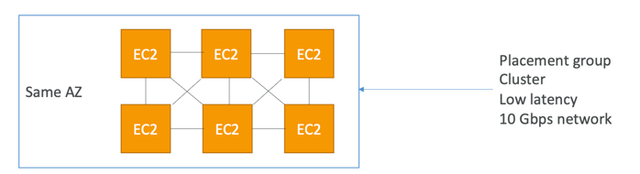
- Cons: If the AZ fails, all instances fails at the same time
- Use case:
- Big Data job that needs to complete fast
- Application that needs extremely low latency and high network throughput
Spread—spreads instances across underlying hardware (max 7 instances per group per AZ)
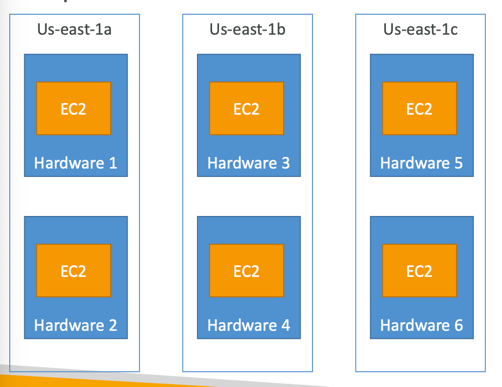
- Pros:
- Can span across Availability Zones (AZ)
- Reduced risk is simultaneous failure
- EC2 Instances are on different physical hardware
- Cons:
- Limited to 7 instances per AZ per placement group
- Use case:
- Application that needs to maximize high availability
- Critical Applications where each instance must be isolated from failure from each other
Partition—spreads instances across many different partitions (which rely on different sets of racks) within an AZ. Scales to 100s of EC2 instances per group(Hadoop, Cassandra, Kafka)
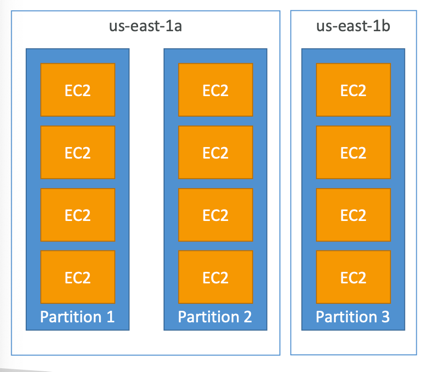
- Up to 7 partitions per AZ
- Can span across multiple AZs in the same region
- Up to 100s of EC2 instances
- The instances in a partition do not share racks with the instances in the other partitions
- A partition failure can affect many EC2 but won’t affect other partitions
- EC2 instances get access to the partition information as metadata
- Use cases: HDFS, HBase, Cassandra, Kafka
EC2 Instance Purchase Options
On-Demand Instances
- Flexible and predictable, billed by second (Linux/Windows).
- High cost, no upfront payment, no long-term commitment.
- Ideal for:
- Short-term, unpredictable workloads.
- Applications requiring flexibility.
Reserved Instances (1 & 3 Years)
- Up to 72% discount vs. On-Demand.
- Options:
- Standard: Fixed instance attributes.
- Convertible: Flexibility to change instance types and configurations.
- Ideal for steady-state usage (e.g., databases).
Savings Plans
- Commitment to specific hourly usage for 1 or 3 years.
- Discounts up to 72%, similar to Reserved Instances.
- Flexible across instance sizes, OS, and tenancy.
Spot Instances
- Cost-efficient: Up to 90% discount vs. On-Demand.
- Instances can be terminated when spot price exceeds bid price.
- Suitable for:
- Batch jobs
- Data analysis
- Non-critical or flexible workloads
Dedicated Hosts
- Physical server dedicated to your use.
- Meets compliance or licensing needs (e.g., BYOL).
- Most expensive option.
- Use cases:
- Software with complex licensing models
- Regulatory requirements
Dedicated Instances
- Instances run on hardware exclusive to you.
- No control over instance placement.
- May share hardware with other instances in your account.
Capacity Reservations
- Reserve capacity in a specific AZ.
- Pay On-Demand rates, regardless of usage.
- No long-term commitment; cancel anytime.
Purchase Option Summary
| Option | Discount | Commitment | Best For |
|---|---|---|---|
| On-Demand | None | None | Short-term, unpredictable workloads |
| Reserved | Up to 72% | 1-3 years | Steady-state applications |
| Savings Plans | Up to 72% | 1-3 years | Flexible long-term usage |
| Spot | Up to 90% | None | Cost-sensitive, flexible workloads |
| Dedicated Hosts | None | Optional | Compliance or BYOL requirements |
| Capacity Reservation | None | None | Reserved capacity in a specific AZ |
Shared Responsibility Model
AWS Responsibilities:
- Infrastructure security (e.g., global networks, physical hosts).
- Hardware maintenance and compliance validation.
User Responsibilities:
- Configure Security Groups.
- Apply OS patches and updates.
- Manage IAM Roles and user permissions.
- Secure data on EC2 instances.
Shared Responsibility Storage
AWS Responsibilities:
- Infrastructure
- Replication for data for EBS volumes & EFS drives
- Replacing faulty hardware
- Ensuring their employees cannot access your data
User Responsibilities:
- Setting up backup / snapshot procedures
- Setting up data encryption
- Responsibility of any data on the drives
- Understanding the risk of using EC2 Instance Store
Summary
EC2 Components:
- Users manage: Instance type, configuration, and security.
- AWS manages: Infrastructure, host isolation, and compliance.
EC2 Storage:
EBS volumes:
- network drives attached to one EC2 instance at a time
- Mapped to an Availability Zones
- Can use EBS Snapshots for backups / transferring EBS volumes across AZ
- AMI: create ready-to-use EC2 instances with our customizations
- EC2 Image Builder: automatically build, test and distribute AMls
- EC2 Instance Store: High performance hardware disk attached to our EC2 instance
- Lost if our instance is stopped / terminated
- EFS: network file system, can be attached to 100s of instances in a region
- EFS-IA: cost-optimized storage class for infrequent accessed files
- FSx for Windows: Network File System for Windows servers
- FSx for Lustre: High Performance Computing Linux file
Key Features:
- Instance Variety: Optimized for compute, memory, or storage.
- Purchase Options: Tailored for cost and workload requirements.
- Security: Control traffic with Security Groups and shared responsibility for instance security.
By understanding and optimizing EC2 capabilities, users can build scalable, cost-effective, and secure solutions in AWS.