Overview
- Route53 is a Managed DNS (Domain Name System)
- DNS is a collection of rules and records which helps clients understand how to reach a server through URLs.
- In AWS, the most common records are:
- www.google.com => 12.34.56.78 == A record (IPV4)
- www.google.com => 2001:0db8:85a3:0000:0000:8a2e:0370:7334 == AAAA IPv6
- search.google.com => www.google.com == CNAME: hostname to hostname
- example.com => AWS resource == Alias (ex: ELB, CloudFront, S3, RDS, etc...)
DNS Terminologies
- Domain Registrar: Amazon Route 53, GoDaddy, ...
- DNS Records: A, AAAA, CNAME, NS, ...
- Zone File: contains DNS records
- Name Server: resolves DNS queries (Authoritative or Non-Authoritative)
- Top Level Domain (TLD): .com, .us, .in, .gov, .org, ...
- Second Level Domain (SLD): amazon.com, google.com, ...
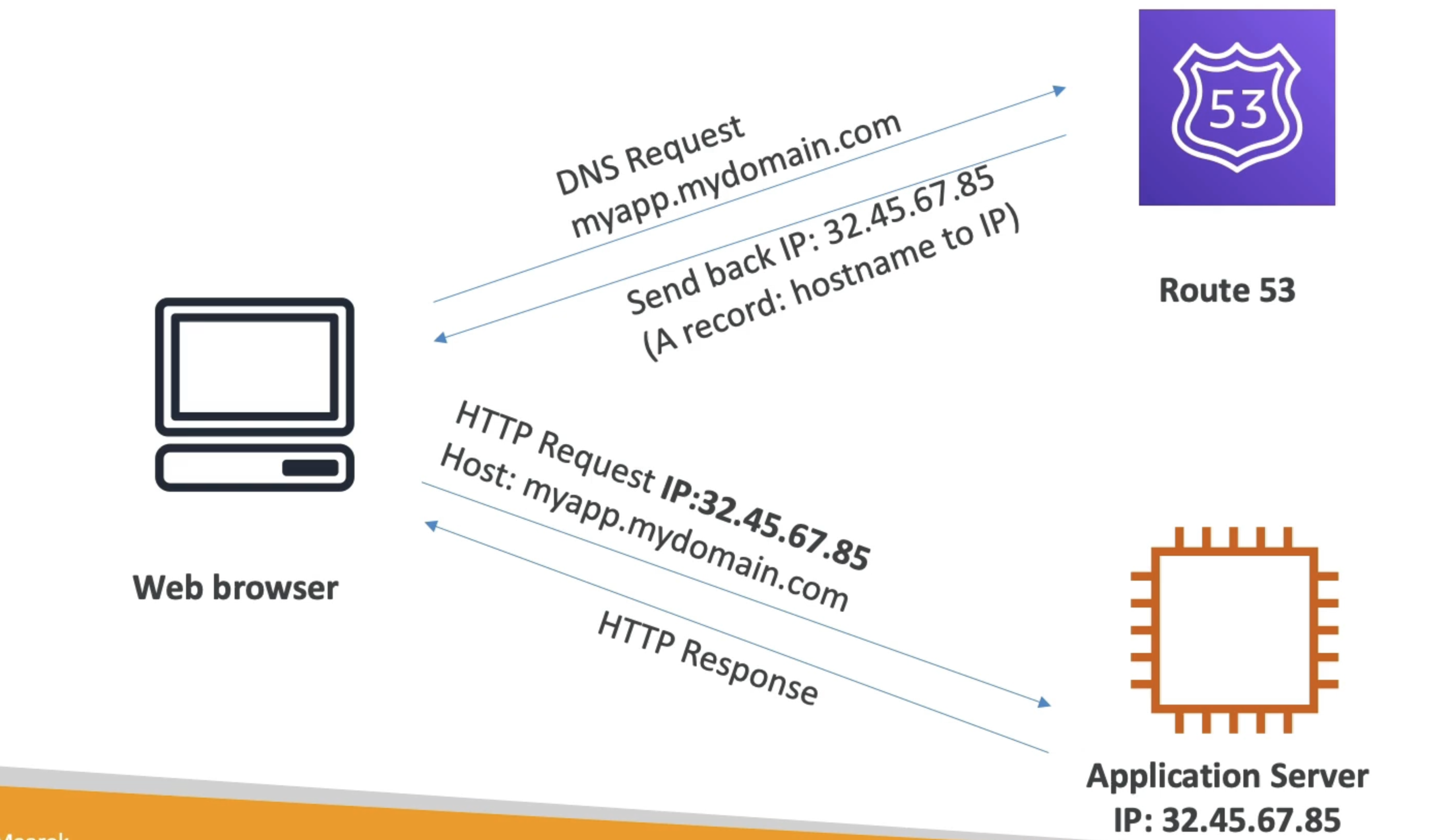
DNS work diagram

Diagram
Routing Policies
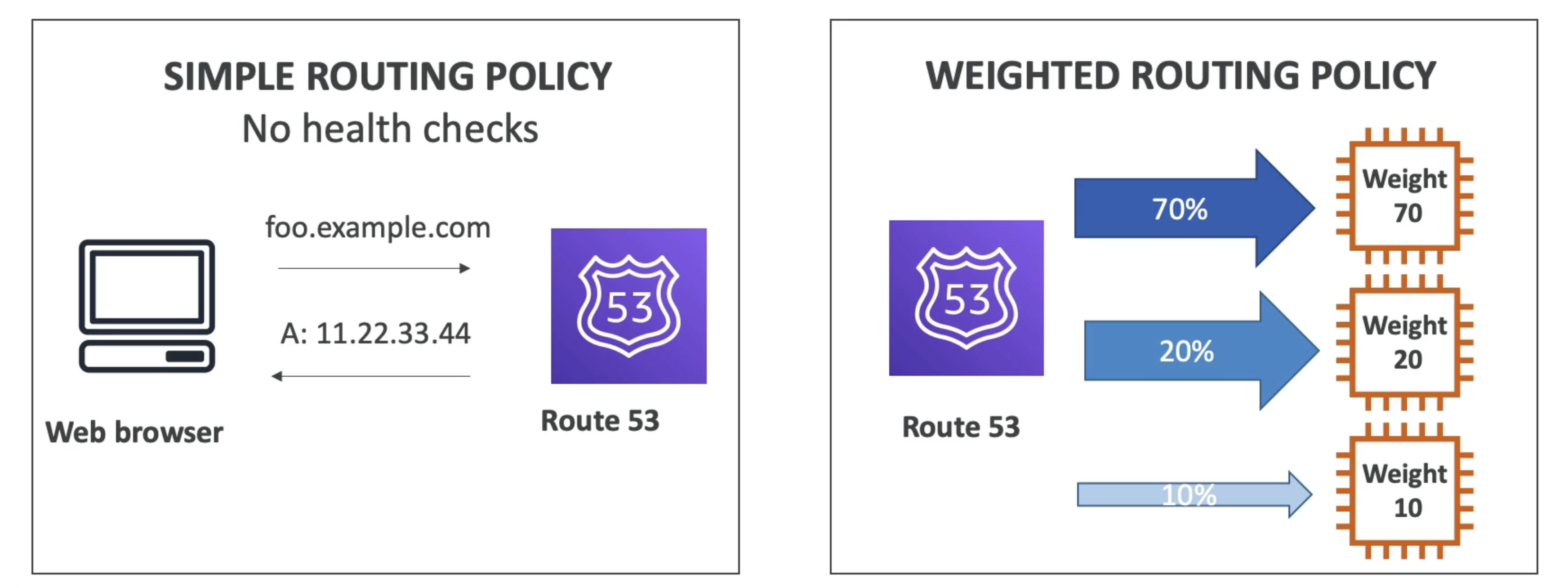
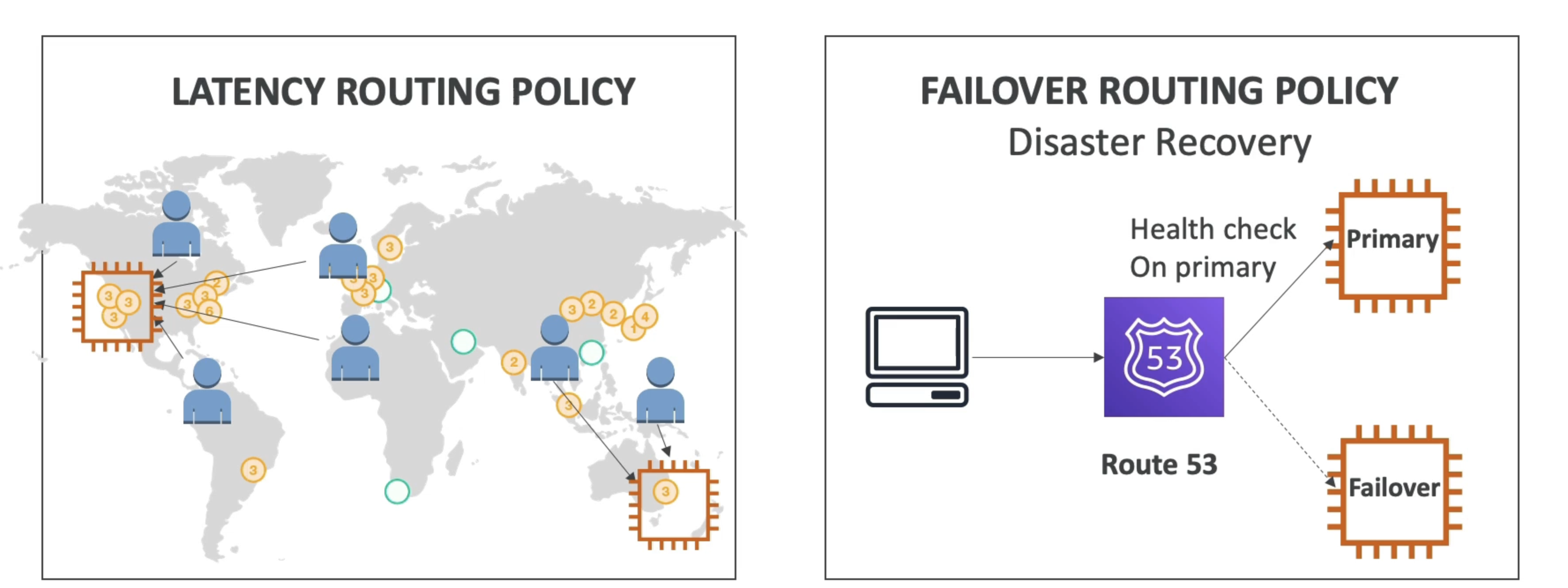
- Define how Route 53 responds to DNS queries
- Don’t get confused by the word “Routing”
- It’s not the same as Load balancer routing which routes the traffic
- DNS does not route any traffic, it only responds to the DNS queries
- Route 53 Supports the following Routing Policies
- Simple
- Weighted
- Failover
- Latency based
- Geolocation
- Multi-Value Answer
- Geoproximity (using Route 53 Traffic Flow feature)
Simple Routing Policy
- Typically, route traffic to a single resource
- Can specify multiple values in the same record
- If multiple values are returned, a random one is chosen by the client
- When Alias enabled, specify only one AWS resource
- Can’t be associated with Health Checks
Weighted Routing Policy
- control the percentage the request that go to each specific resource
- Weights don’t need to sum up to 100
- DNS records must have the same name and type
- Can be associated with Health Checks
- Use cases: load balancing between regions, testing new application versions…
- Assign a weight of 0 to a record to stop sending traffic to a resource
- If all records have weight of 0, then all records
Latency Routing Policy
- Redirect to the resource that has the least latency close to us
- Super helpful when latency for users is a priority
- Latency is based on traffic between users and AWS Regions
- Germany users may be directed to the US (if that’s the lowest latency)
- Can be associated with Health Checks (has a failover capacity)
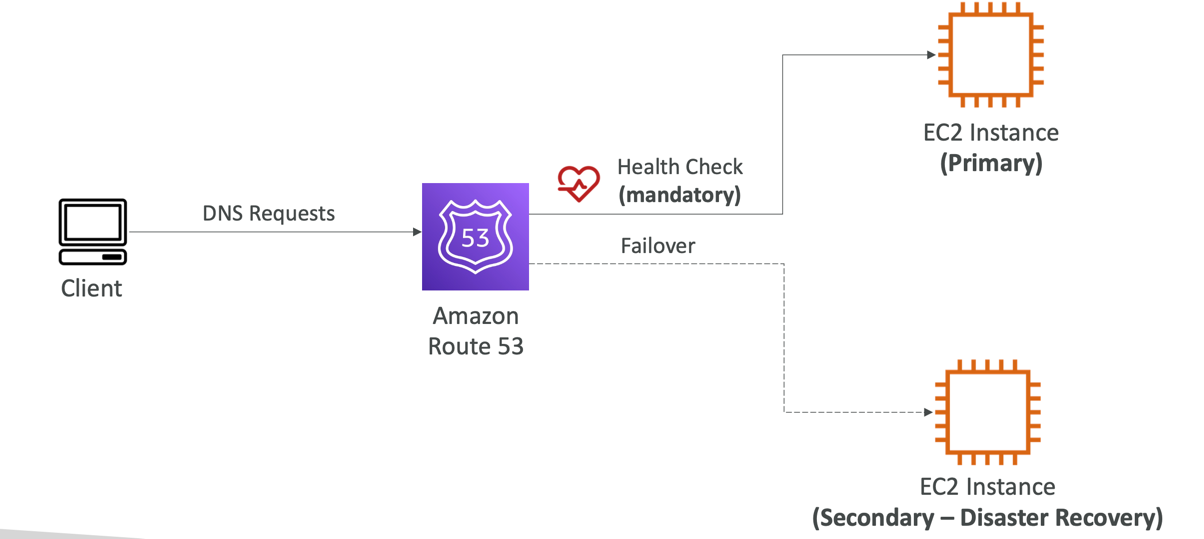
Failover Routing Policy(Active-Passive)
Geolocation Routing Policy
- Different from Latency-based!
- This routing is based on user location
- Specify location by Continent, Country or by US State (if there’s overlapping, most precise location selected)
- Should create a “Default” record (in case there’s no match on location)
- Use cases: website localization, restrict content distribution, load balancing, ...
- Can be associated with Health Checks
Geo proximate Routing Policy
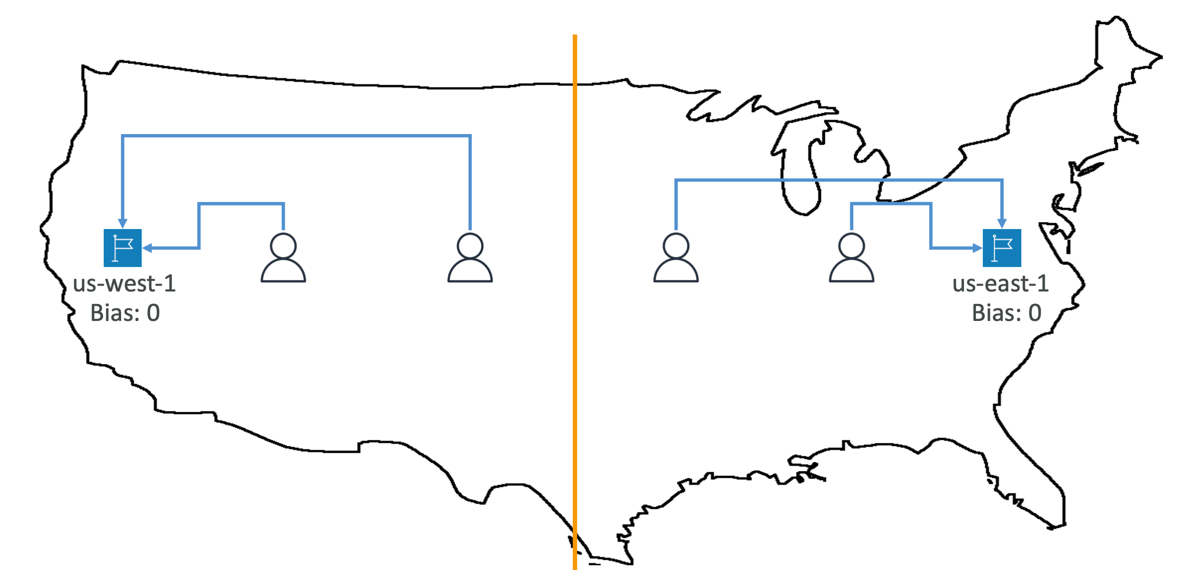
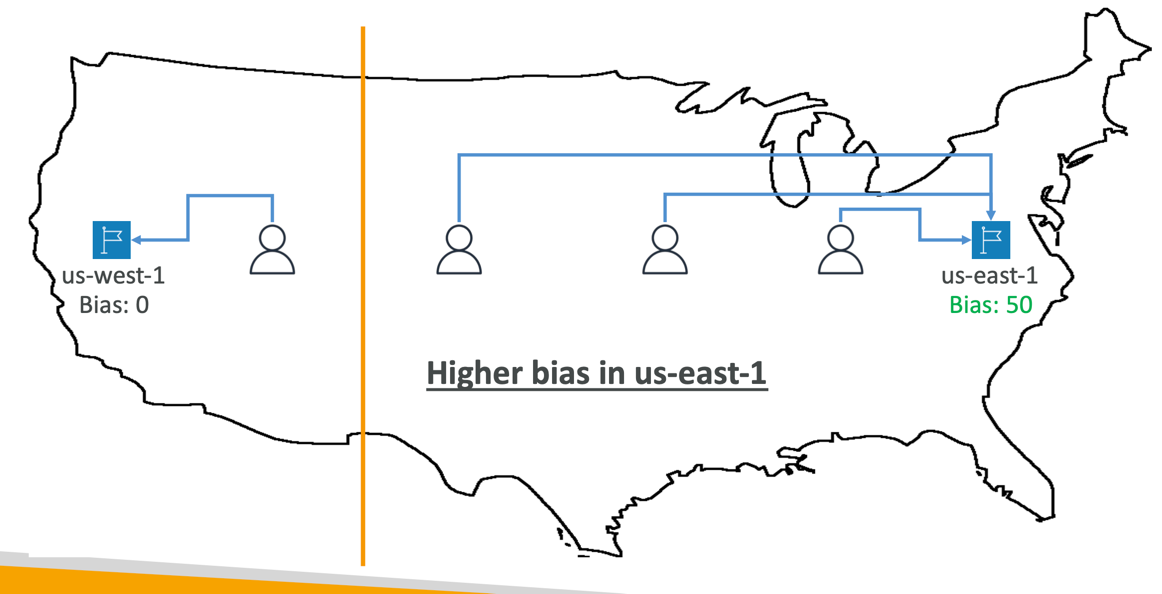
- Route traffic to your resources based on the geographic location of users and resources
- Ability to shift more traffic to resources based on the defined bias
- To change the size of the geographic region, specify bias values:
- To expand (1 to 99) – more traffic to the resource
- To shrink (-1 to -99) – less traffic to the resource
- Resources can be:
- AWS resources (specify AWS region)
- Non-AWS resources (specify Latitude and Longitude)
- You must use Route 53 Traffic Flow to use this feature
IP based Routing Policy
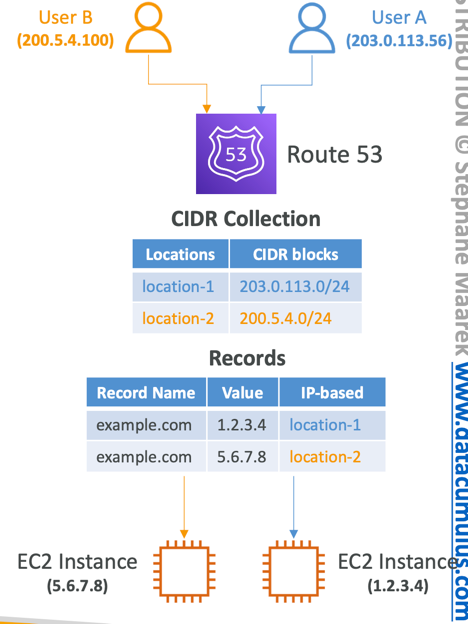
- Routing is based on clients’ IP addresses
- You provide a list of CIDRs for your clients and the corresponding endpoints/locations(user-IP-to-endpoint mappings)
- Use cases: Optimize performance, reduce network costs…
- Example: route end users from a particular ISP to a specific endpoint
Multi value Routing Policy
- Use when routing traffic to multiple resources
- Route 53 return multiple values/resources
- Can be associated with Health Checks (return only values for healthy resources)
- Up to 8 healthy records are returned for each Multi-Value query
- Multi-Value is not a substitute for having an ELB
Record
- How you want to route traffic for a domain
- Each record contains:
- Domain/subdomain Name – e.g., example.com
- Record Type – e.g., A or AAAA
- Value – e.g., 12.34.56.78
- Routing Policy – how Route 53 responds to queries
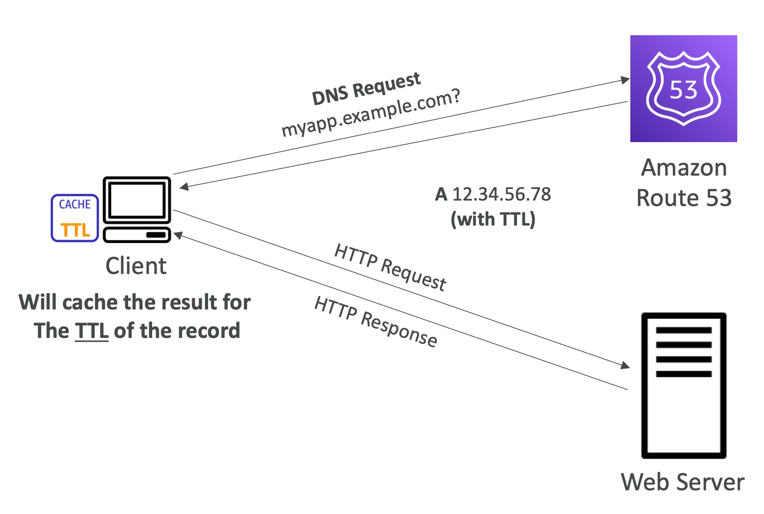
- TTL – amount of time the record cached at DNS Resolvers
- Route 53 supports the following DNS record types:
- (must know) A / AAAA / CNAME / NS
- (advanced) CAA / DS / MX / NAPTR / PTR / SOA / TXT / SPF / SRV
Record Types
- A – maps a hostname to IPv4
- AAAA – maps a hostname to IPv6
- CNAME – maps a hostname to another hostname
- The target is a domain name which must have an A or AAAA record
- Can’t create a CNAME record for the top node of a DNS namespace (Zone Apex)
- Example: you can’t create for example.com, but you can create for www.example.com
- NS – Name Servers for the Hosted Zone
- Control how traffic is routed for a domain
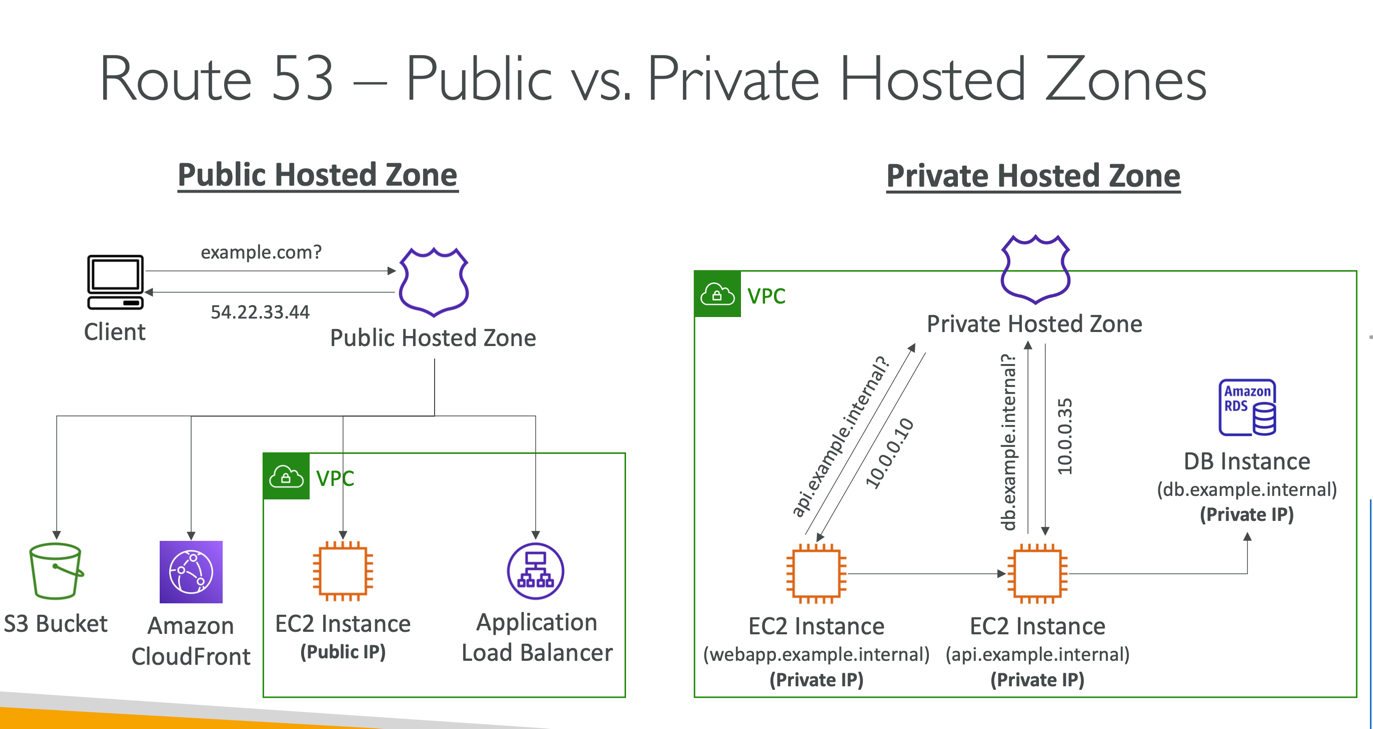
Hosted Zone
- A container for records that define how to route traffic to a domain and its subdomains
- Public Hosted Zones – contains records that specify how to route traffic on the Internet (public domain names)application1.mypublicdomain.com
- Private Hosted Zones – contain records that specify how you route traffic within one or more VPCs (private domain names)application1.company.internal
- You pay $0.50 per month per hosted zone
Record TTL(Time To Live)
-
High TTL – e.g., 24 hr
- Less traffic on Route 53
- Possibly outdated records
-
Low TTL – e.g., 60 sec.
- More traffic on Route 53 ($$)
- Records are outdated for less time
- Easy to change records
-
Except for Alias records, TTL is mandatory for each DNS record
CNAME vs Alias
- AWS Resources (Load Balancer, CloudFront...) expose an AWS hostname:
- lb1-1234.us-east-2.elb.amazonaws.com and you want myapp.mydomain.com
- CNAME:
- Points a hostname to any other hostname. (app.mydomain.com => blabla.anything.com)
- ONLY FOR NON ROOT DOMAIN (aka. something.mydomain.com)
- Alias:
- Points a hostname to an AWS Resource (app.mydomain.com => blabla.amazonaws.com)
- Works for ROOT DOMAIN and NON ROOT DOMAIN (aka mydomain.com)
- Free of charge
- Native health check
Alias Record
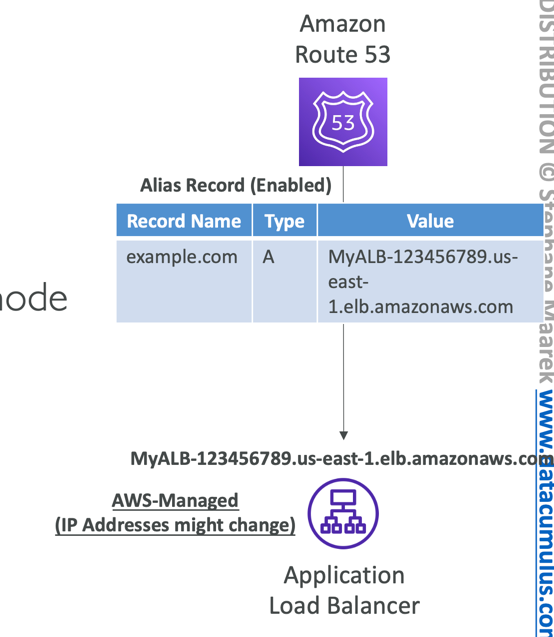
- Maps a hostname to an AWS resource
- An extension to DNS functionality
- Automatically recognizes changes in the resource’s IP addresses
- Unlike CNAME, it can be used for the top node of a DNS namespace (Zone Apex), e.g.:example.com
- Alias Record is always of type A/AAAA for AWS resources (IPv4 / IPv6)
- You can’t set the TTL
Alias Record Target
- Elastic Load Balancers
- CloudFront Distributions
- API Gateway
- Elastic Beanstalk environments
- S3 Websites
- VPC Interface Endpoints
- Global Accelerator accelerator
- Route 53 record in the same hosted zone
- You cannot set an ALIAS record for an EC2 DNS name
Health Checks
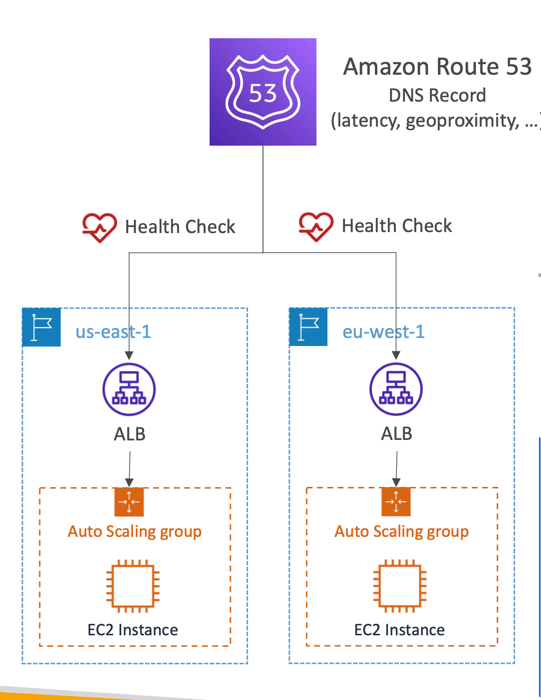
- HTTP Health Checks are only for public resources
- Health Check => Automated DNS Failover:
- Health checks that monitor an endpoint(application, server, other AWS resource)
- Health checks that monitor other health checks (Calculated Health Checks)
- Health checks that monitor CloudWatch Alarms (full control !!) – e.g., throttles of DynamoDB, alarms on RDS, custom metrics, ... (helpful for private resources)
- Health Checks are integrated with CW metrics
Health Check Types
Health Check - Monitoring Endpoint
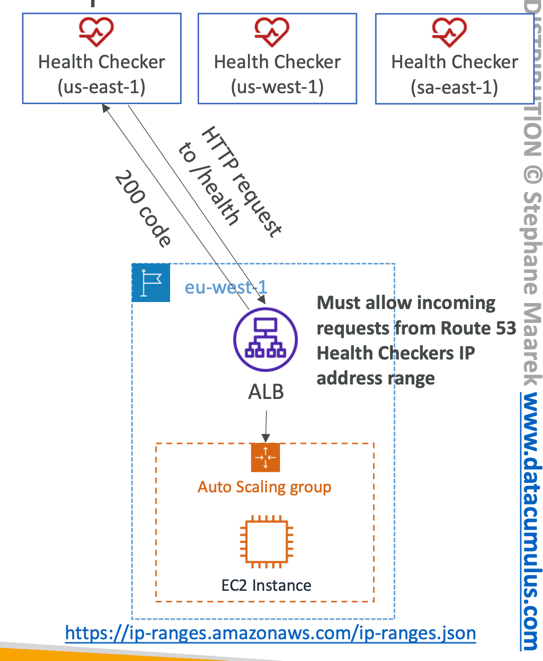
- About 15 global health checkers will check the endpoint health
- Healthy/Unhealthy Threshold – 3 (default)
- Interval – 30 sec (can set to 10 sec – higher cost)
- Supported protocol: HTTP, HTTPS and TCP
- If > 18% of health checkers report the endpoint is healthy, Route 53 considers it Healthy. Otherwise, it’s Unhealthy
- Ability to choose which locations you want Route 53 to use
- Health Checks pass only when the endpoint responds with the 2xx and 3xx status codes
- Health Checks can be setup to pass / fail based on the text in the first 5120 bytes of the response
- Configure you router/firewall to allow incoming requests from Route 53 health checkers
Calculated Health Checks
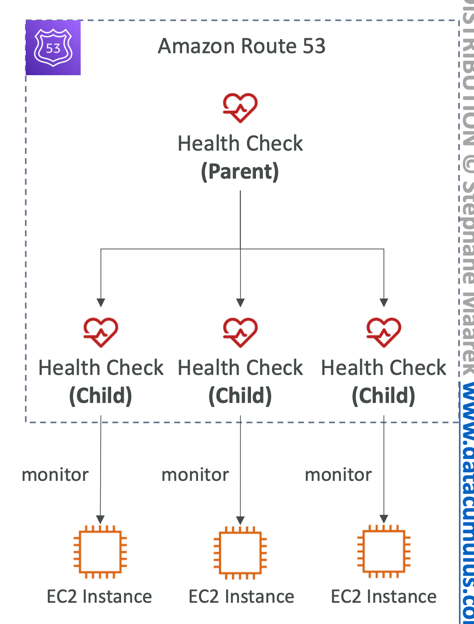
- Combine the results of multiple Health Checks into a single Health Check
- You can use OR, AND, or NOT
- Can monitor up to 256 Child Health Checks
- Specify how many of the health checks need to pass to make the parent pass
- Usage: perform maintenance to your website without causing all health checks to fail
Health Check - Private Hosted Zone
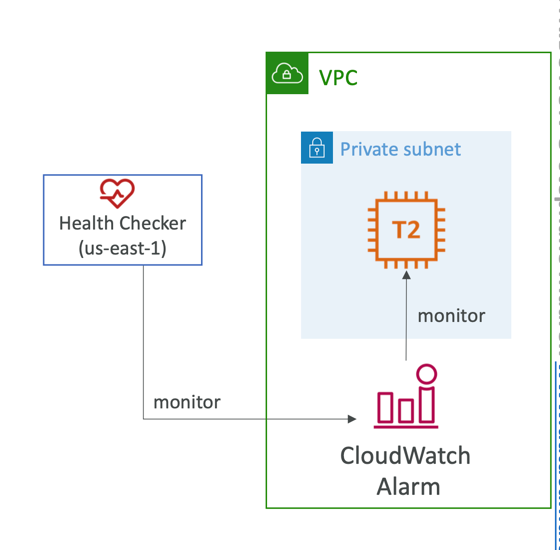
- Route 53 health checkers are outside the VPC
- They can’t access private endpoints(private VPC or on-premises resource)
- You can create a CloudWatch Metric and associate a CloudWatch Alarm, then create a Health Check that checks the alarm itself